Delete apps - Easy Uninstall
- 4.3
- Rating
- 1.00M
- Installs
- Free
- Price

 Analysis by App-foxy
I often install an app for a single task and then forget about it until my phone starts feeling crowded. That is where Delete apps - Easy Uninstall makes sense. It is a free tools app from DOSA Apps built around one practical job: helping me remove unwanted applications without hunting through every settings menu. I see it as a small maintenance tool rather than something I would keep open every day.
The idea is simple, but the usefulness depends on how quickly I can find the app I no longer need and how confidently I can remove it. In my experience, the appeal is less about adding a new feature to Android and more about making an ordinary cleanup task easier to repeat. If you regularly test apps, manage a family device, or need to clear out old downloads, that focused approach can be convenient.
What the uninstall workflow feels like
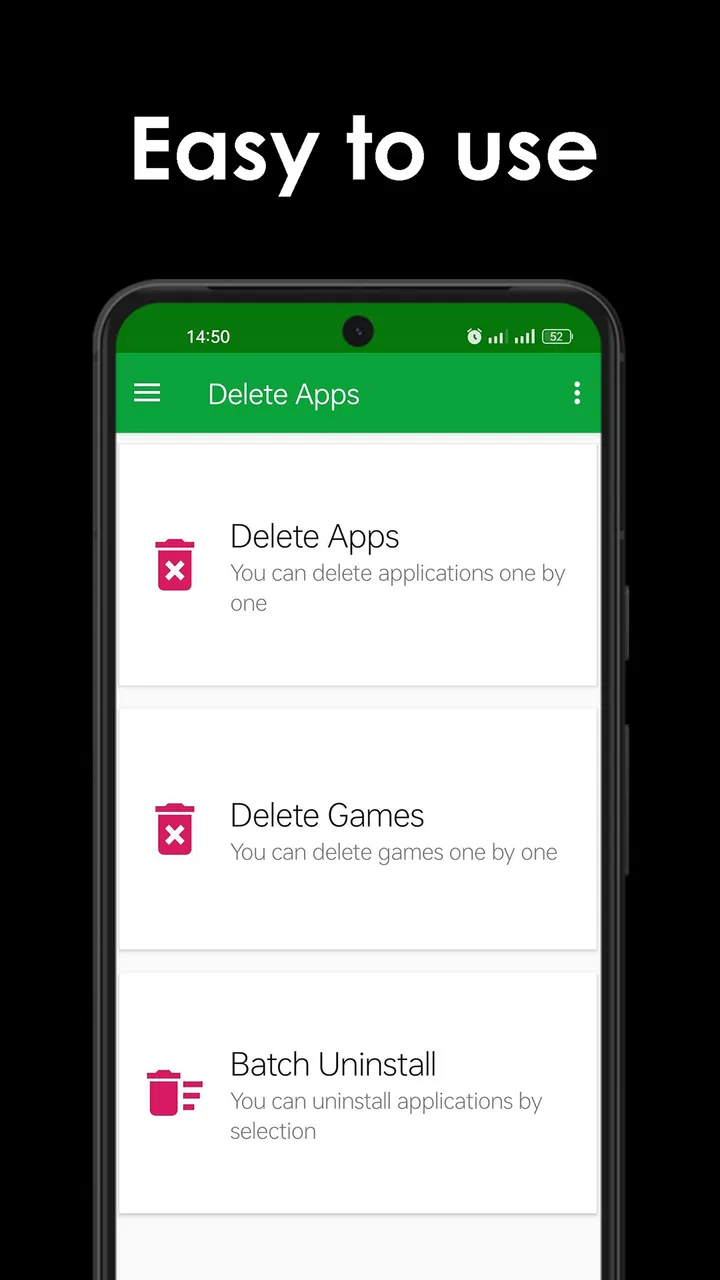
The first thing I noticed is that this is not trying to become a full phone optimizer. Its identity is centered on app removal, which keeps the purpose clear. Instead of treating storage cleanup as a complicated project, I can use it as a quick review of the applications installed on my device and remove the ones that have outlived their usefulness.
You May Also Like

 Blood Strike: 2.5 Anniversary
Blood Strike’s Loadouts Turn Every Drop Into a Tactical Gamble
A close look at Blood Strike’s custom loadouts: how fast access to signature weapons reshapes its battle royale rhythm, rewards preparation, and narrows the gap between fights.

 Pandora - Music & Podcasts
Pandora’s Music Is Easy to Start, but Harder to Recover
Pandora’s strength is its low-effort path from a seed to a station. Its weak spot is how much confidence it asks you to place in connection, setup, and quiet recovery.

 8 Ball Pool
 Is Built on Rivalries, Rematches, and Routine
A close look at the rivalries, rematches, shared routines, and unanswered safety questions that turn a quick pool match into a persistent mobile community.

 Samsung Music
’s Quiet Strength Is Playing What You Already Own
Its reach comes less from spectacle than from dependable access to a personal library. That simplicity is both the app’s strongest retention engine and its ceiling.

 AccuWeather: Weather Radar
AccuWeather Review: A Quick, Clear Forecast for Everyday Decisions
For everyday plans, the best forecast is the one you can understand quickly. AccuWeather makes rain timing, radar, and local conditions easy to act on, with a few trade-offs.

 Hill Climb Racing
Why Hill Climb Racing Still Turns Crashes Into One More Run
A tiny car, a bumpy hill and one more upgrade: Hill Climb Racing keeps resurfacing because its simple chaos makes every near-miss feel personal.
More From Our News Desk



That focus also sets the right expectation. This is not a replacement for Android's complete system settings, and I would not use it when I need detailed control over every system component. It is better suited to ordinary installed apps that I recognize and deliberately want to uninstall. When I am cleaning up after trying several new apps, a dedicated removal screen feels more direct than opening each application page separately.
The app is free to download, which makes it easy to try without committing money first. It is rated for Everyone, so its purpose is straightforward enough for a broad audience. The current version is 5.1.1, and the minimum requirement is Android 8.0, a sensible point to check before installing it on an older phone.
One useful habit is to treat the list as a decision-making screen rather than tapping quickly through it. I pause on unfamiliar names, check whether I still use them, and only then start removing anything. A fast uninstall tool can save time, but it can also make an accidental tap more costly if I am careless. The best experience comes from pairing its convenience with a short review of what each app does.
Where it saves time
For me, the biggest benefit appears after a period of experimentation. I might install a recipe app, a document scanner, a shopping tool, and a game for a particular occasion. A few weeks later, those apps are still occupying space even though I no longer open them. Rather than remembering each one individually, I can use this utility as a dedicated cleanup pass.
That workflow is especially useful on a shared tablet. A child may try several educational or entertainment apps, while another family member needs room for photos or documents. I can review the installed collection in one sitting and remove clearly abandoned items. The app does not replace judgment, but it reduces the friction that often causes people to postpone maintenance.
Another practical use is preparing a phone before handing it to someone else. I would not rely on an uninstall helper as a substitute for a proper reset when privacy is involved, but it can help remove test apps, temporary tools, and old games before a more thorough handover. That distinction matters: deleting an app is not the same as securely erasing every piece of personal data associated with it.
I also find it useful after troubleshooting. If I installed several utilities while trying to solve a connection or battery problem, I can later remove the ones that did not help instead of leaving them in place indefinitely. This keeps the cleanup process separate from the original problem and makes it less likely that temporary tools become permanent clutter.
Speed during a normal cleanup
The perceived speed of a tool like this comes mainly from reducing the number of steps between spotting an unwanted app and starting its removal. I would not expect it to transform the actual uninstall operation performed by Android, because the operating system still controls that part. Its value is in the selection and organization stage.
On a phone with a modest number of installed apps, that approach should feel naturally quick because there is less to scan. On a device that has accumulated years of downloads, the important question is not only whether the list appears promptly, but whether I can recognize the right entries without confusion. A clean, focused workflow matters more here than flashy animation or a long list of extra tools.
I would use it when I have five minutes between tasks, not only during a major storage emergency. Short, regular cleanup sessions are easier to manage than waiting until the phone is nearly full. That is one of the app's quiet strengths: it encourages a small maintenance habit instead of making cleanup feel like a technical project.
There is also a trade-off between speed and caution. Removing several apps in succession can be efficient, but I prefer to stop and verify anything with a vague name, an icon I do not recognize, or a connection to work, banking, accessibility, or device management. The app can make the action quicker; it cannot know which applications are important in my personal routine.
How it handles heavier use
The more demanding moment is not a single uninstall. It is a large cleanup session on a crowded device, especially when I am reviewing many old applications one after another. In that situation, I care about whether the interface remains understandable and whether I can keep track of what I have already selected or removed.
I would approach a large session in batches. First I remove obvious abandoned games and one-purpose tools. Then I restart the review later for less familiar apps. This two-stage method is safer than trying to make every decision in one pass, and it also makes any unexpected change easier to identify.
It is important to separate the app's own workload from Android's uninstall process. The helper can present the removal task, but the system may still ask for confirmation or handle each package according to its own rules. If an app is protected, preinstalled, or managed by the device, I would expect the normal Android restrictions to remain relevant rather than assuming a third-party utility can bypass them.
That limitation is actually reassuring. A removal tool should not promise magical access to components that the operating system intends to protect. For routine cleanup, the extra confirmation may feel like a pause, but it also gives me a chance to cancel when I realize I selected the wrong item.
Stability and recovery after a mistake
Reliability here means more than staying open. I want the app to help me reach the correct uninstall action without making the process mysterious. Because removing an application changes the device, I value clear steps and predictable behavior more than a large collection of secondary features.
My main recovery rule is simple: I do not uninstall anything I may need until I have checked whether its data matters. Reinstalling an app later may not restore local settings, offline files, or unsynchronized information. A removal helper can make the uninstall request convenient, but it cannot guarantee recovery of data that the operating system or the app deletes during removal.
For that reason, I would use it differently for different categories. Old games and disposable experiments are low-risk candidates. A note-taking app, authenticator, file manager, or work tool deserves more care. I would confirm that important content is synced or exported before removing it, even if the app appears unused.
If I change my mind, the practical recovery path is usually to install the application again through the normal app store and restore whatever account-based content is available. That is not an instant undo button, so I would never treat a rapid cleanup session as harmless. The right mental model is assisted uninstall, not reversible file management.
The app's broad audience rating makes sense for the basic task, but younger users should still have guidance on a shared device. The interface may be simple, yet the consequences of deleting a useful app are not always obvious. I would let a child browse with me rather than give unrestricted control over a family tablet.
Resource demands and older devices
A focused utility should be easier to justify than a large “all-in-one” cleaner when my concern is keeping the phone uncomplicated. I do not need another dashboard constantly encouraging me to optimize every part of the device. I would open this app when I want to manage applications, complete the task, and close it.
That does not mean it can solve every storage problem. Removing an app may free space, but it does not automatically organize photos, clear browser data, find duplicate files, or repair a slow phone. If my real problem is media storage, I would use a file or photo management solution instead. Choosing the right tool prevents disappointment and avoids installing several overlapping cleaners.
The Android 8.0 minimum requirement is relevant for owners of older hardware. Anyone below that version will need a different approach, usually the built-in application settings or another compatible utility. On supported devices, I would still keep expectations modest: the app is for making uninstall management more convenient, not for making old hardware perform like a new phone.
On a low-storage device, I would install it only when the expected cleanup benefit is worth adding another application temporarily. A sensible workflow is to use it, remove the unwanted apps, and then decide whether I still need the helper. That is particularly reasonable for people who rarely uninstall anything and do not want a permanent maintenance tool.
How it compares with the usual alternatives
Android's built-in settings remain the strongest alternative when I need complete system information, permissions, storage details, or control over unusual packages. They are already present, so there is no extra installation, and they are the place I would go for a system-level explanation of what can and cannot be removed.
The advantage of Delete apps - Easy Uninstall is convenience and focus. It is more appealing when my goal is simply to review installed apps and clear out ordinary clutter. A broader cleaner may offer storage analysis, duplicate detection, or memory tools, but those extras can also make a basic uninstall task feel busier than necessary.
I would choose a file manager when the main target is downloaded content rather than applications. I would choose Android settings when investigating permissions or a stubborn system component. I would choose this utility when the problem is a long list of apps that I no longer want and I prefer a dedicated route to deal with them.
There is also a privacy trade-off whenever I add a third-party tool to a task the operating system can already perform. I would review the app's current permission requests and behavior on my own device before making it part of a regular routine. The convenience is worthwhile only if I am comfortable with that additional layer.
Who should use it, and who should skip it
I think it is a good fit for people who install and remove apps often, maintain a family device, test software, or want a simpler cleanup ritual. It is also useful for someone who finds the standard settings path unnecessarily buried when all they want is to remove ordinary apps.
I would skip it if I almost never uninstall anything, if my phone is running an unsupported Android release, or if I need a complete storage analyzer rather than an app-removal tool. I would also avoid depending on it for managed work devices, protected system packages, or privacy-sensitive handovers. Those situations call for the operating system's own controls or an administrator-approved process.
The developer is DOSA Apps, and the app has reached over a million installs with a 4.3 average from around thirty-two thousand ratings. That level of adoption suggests it has found a clear audience, while the rating also leaves room for the ordinary frustrations that can come with Android differences and uninstall restrictions. I read those figures as evidence of usefulness, not as a reason to skip careful testing on my own phone.
There are in-app purchases ranging from ninety-nine cents to ninety-nine dollars and ninety-nine cents per item. Since the core download is free, I would pay attention to any purchase screen and decide whether extra paid functionality is genuinely useful for my situation. Someone looking only for occasional cleanup may reasonably prefer to stay with the free experience.
My practical verdict
After looking at the app as a daily utility rather than a headline feature, I see its strongest quality in its narrow purpose. It can make app cleanup feel less scattered, especially when my device has accumulated experiments, seasonal tools, or forgotten games. The speed benefit is mostly workflow speed, not a promise that Android itself will uninstall packages instantly.
Its limitations are equally clear. It cannot replace system settings for advanced control, it cannot guarantee that deleted app data will be recoverable, and it cannot solve storage problems caused by photos or other files. Large cleanup sessions still require attention, and older or managed devices may impose restrictions that no helper should be expected to bypass.
My advice is to use it in short, deliberate passes: remove obvious clutter first, check important data before deleting anything less familiar, and keep the built-in Android tools in mind for exceptions. If that matches the way you manage your phone, Delete apps - Easy Uninstall is a sensible free addition to the tools category. I would recommend it to a friend who wants a more direct uninstall routine, while reminding them that convenience should never replace a quick backup and a careful final check.
FAQs for Delete apps - Easy Uninstall
01What is Delete apps - Easy Uninstall used for?
Delete apps - Easy Uninstall is designed to help you remove applications from your device more conveniently than searching through the standard settings menu. It can provide a list of installed apps and make it easier to identify unwanted programs, review basic app details, and start the uninstall process. The final removal still depends on your device’s operating system permissions and restrictions.
02Does Delete apps - Easy Uninstall completely remove an app and its data?
The application mainly starts the normal uninstall process provided by Android or the relevant operating system. In most cases, uninstalling an app removes its installed package, but leftover files, downloaded media, accounts, backups, or cloud data may remain separately. Before deleting an important app, check its settings and back up anything you may need, because this tool cannot guarantee recovery of removed information.
03Can Delete apps - Easy Uninstall uninstall system or preinstalled applications?
Whether a preinstalled or system application can be removed depends on your device manufacturer, Android version, and available permissions. Delete apps - Easy Uninstall can generally help you identify installed applications, but it cannot bypass protected system restrictions or root-level controls. Some built-in apps may only be disabled, hidden, or have updates removed rather than fully uninstalled.
04Is Delete apps - Easy Uninstall safe to use?
The app is generally intended to simplify a standard device-management task, but users should still review each application carefully before confirming deletion. Removing essential system components or apps connected to authentication, messaging, backups, or device security can cause problems. Download it from a trusted store, examine requested permissions, and avoid uninstalling anything whose purpose you do not recognize.
05Does Delete apps - Easy Uninstall require root access or an internet connection?
For ordinary app removal, root access is usually not required because the tool can open the operating system’s regular uninstall confirmation screen. An internet connection is typically unnecessary for selecting and removing locally installed apps, although advertisements, updates, or additional information may require connectivity. Device behavior can vary according to the manufacturer, Android version, and app permissions.
Pros
- Uninstalls apps quickly with a simple
- beginner-friendly interface.
- Useful for removing multiple unwanted apps in one session.
- Helps free storage by clearing apps you no longer need.
- Makes it easier to review installed apps before deleting them.
- Lightweight design should run smoothly on most Android devices.
Cons
- System apps and some preinstalled apps cannot be removed without root access.
- Bulk uninstalling may still require confirmation for each individual app.
- Removing an app also deletes its local data unless it was backed up.
- Features may vary depending on your Android version and device manufacturer.
- The app may display ads or request permissions that some users may dislike.

Delete apps - Easy Uninstall
Gallery